

Folder Structure
The LTT TS directory is the root of the LTT test execution system. At top level it contains the actual TestStand sequence file implementing your specific LTT testplan (and/or the template sequence file). It also contains the following sub folders:
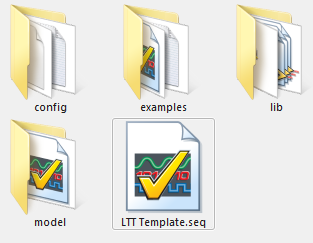
| Folder | Content |
|---|---|
| config | Contains the TestStand configuration like StationGlobals, search paths, type definitions and so on. During installation of the LTT software the TestStand configuration directory will be set to this location. The default TestStand configuration directory is at C:\ProgramData\National Instruments\TestStand\ and stays untouched. |
| examples | Contains MesSy examples sequences for both MesSy V1 and V2. You can copy those sequences into your own testplan as needed. |
| lib | Contains code modules (LabView, .NET) needed to operate the LTT. Specifically you will find there:ddd |
| model | Contains the LTT process model |
The lib folder
The lib folder contains some standard sub folder and files, which will be explained here. But it is also the place to put in your project specific assets, like additional DLL's or LabView VI's. Feel free to add more sub folders / LLB's / DLL's or VI's. But do not place your specific assets into one of the existing standard sub folders, since they get replaced by each LTT software update!
| Item | Description |
|---|---|
| IRS.MesSy | |
| IRS.MesSyFD | |
| IRS.Mod | |
| IRS.LTT.Mod.API.lvlibp | |
| IRS.LTT.Mod.Loader.lvlibp | |
| IRS.LTT.Mod.Test.exe | |
| IRS.LTT.TS.API.lvlibp | |
| IRS.LTT.TS.UserLib.lvlibp | |
| IRS.Rendezvous.lvlibp |