

F2 Reset Errors
In this dialog you can reset certain things related to individual test stations. You can select what to reset and which stations to reset. The dialog can be opened through different buttons / key combinations. Each type of invocation results in different reset options to be preset. Despite of the preset options you are free to change them after the dialog has opened.
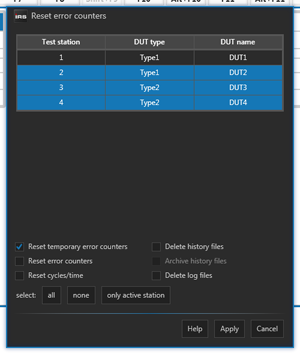
Use F2 to reset the temporary error counters. Use Alt+F6 to clear all station data (incl. history data). Use Alt+F12 to only clear the history data.
| Function | Description |
|---|---|
| Reset temp. error counters | Resets the temp. error counters of the current test order of the selected stations. |
| Reset error counters | Resets the error counters of the current test order of the selected stations. |
| Reset cycles / time | Resets the runtime and the cycle counter of the current test order of the selected stations. |
| Delete history files | Deletes all history files of the current test order of the selected stations. |
| Archive history files | Archives all history files of the current test order of the selected stations. |
| Delete log files | Deletes all log files of the selected stations. |
The "Archive history files" function is only selectable if the dialog is opened through the corresponding button inside the Alt-F10 dialog.